Hakkas
Control programs you draw instead of write. Wire blocks together in your browser, and watch the diagram run live on the controller.
Hakkas turns a Colibri controller into a programmable automation station for heating, ventilation and building services. Place a PID regulator, a week schedule or a comparator on the canvas, connect them, bind them to the controller's inputs and outputs, and it runs. No toolchain, no compile, no download.
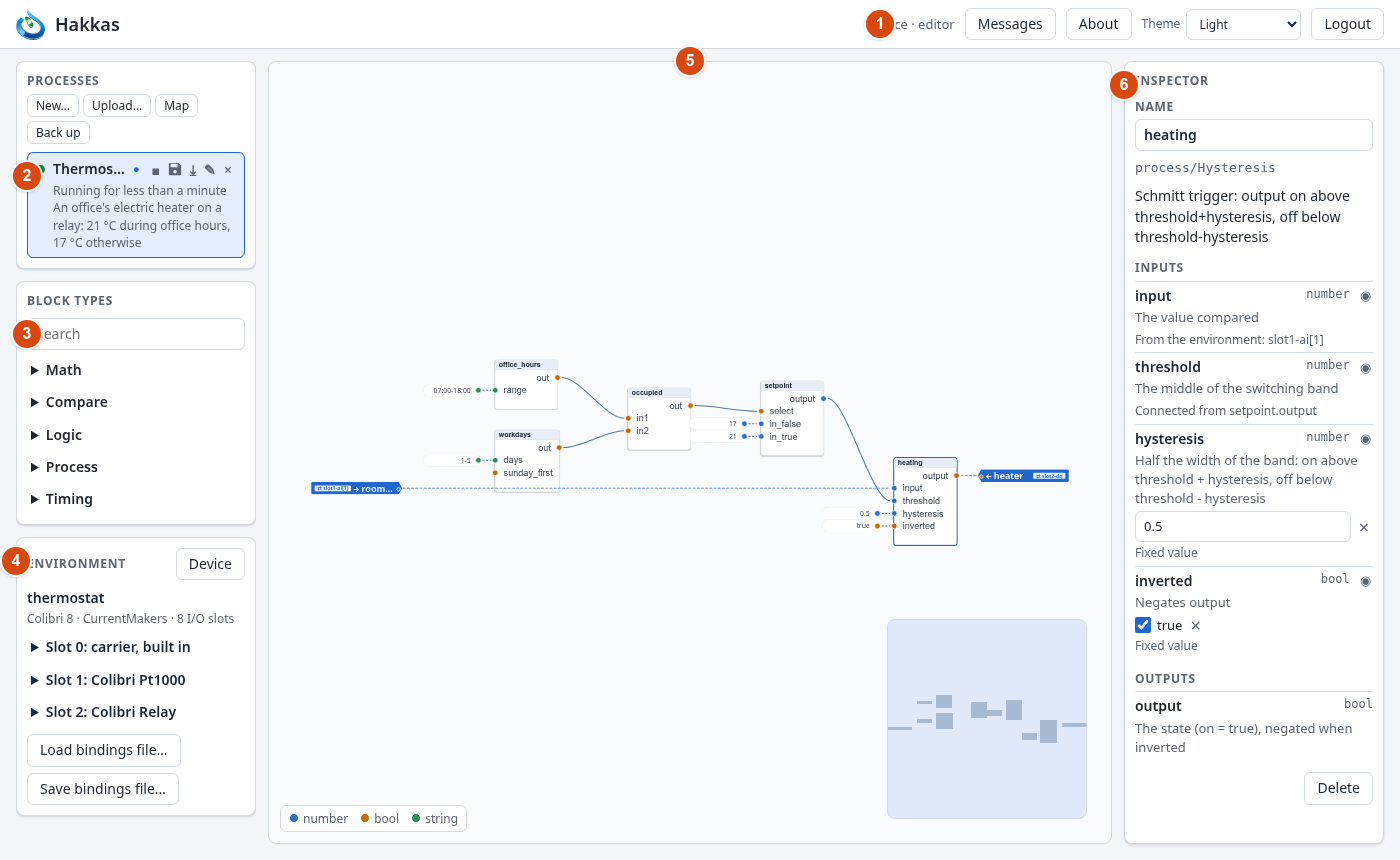
If you have programmed PLCs, you already know most of Hakkas: function blocks, wires, regulators and timers. A Hakkas process is close to a program in the IEC 61131-3 Function Block Diagram language. What changes is everything around it: the editor is always online, the controller is the single source of truth, and the same program moves between controllers by rebinding its ports, not by rewriting addresses.
Why Hakkas?
No compile, no download
Every change you make, whether a block added, a wire moved or a setpoint changed, is applied on the controller at once, even while the process runs. What the editor shows is always what runs.
Nothing to install
The controller serves the editor as a web page. Open its address in Chrome, Edge or Firefox, log in, and you are programming.
Event-driven, not scanned
A block computes when one of its inputs changes, and only changes travel on. Values below a change threshold stop at the first block, so noise never ripples through the program.
I/O is bound, not addressed
A process has named ports such as outdoor_temperature and heating_valve, and you bind them to the controller's channels. Move the process to another controller and bind it there.
Built for teams
Several people can work on the same controller at once, each seeing the others' changes as they happen. Viewer, operator and editor roles are enforced by the controller itself.
Your own block library
Select a group of blocks that does one job, such as a shunt group or a frost protection, and make it a composite block type, ready for reuse in every process.
Real control, at a glance
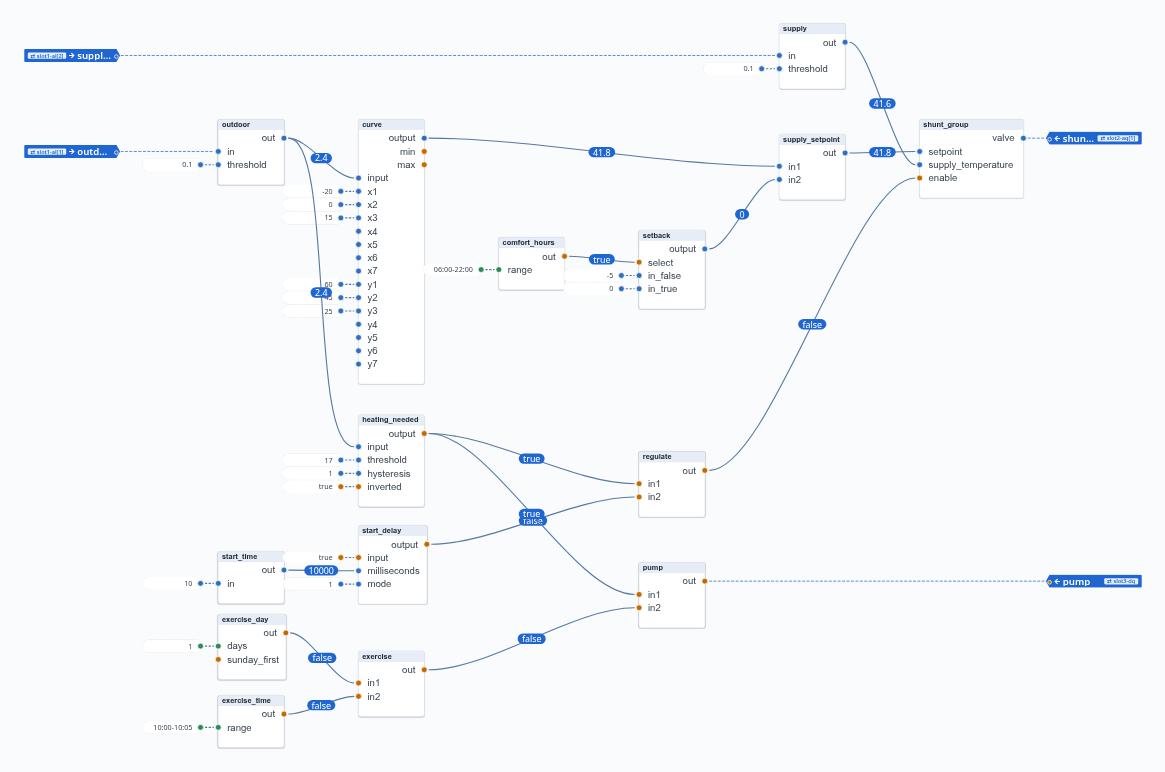
A heating circuit is a single page: the outdoor sensor feeds a heating curve, a comfort schedule lowers the setpoint at night, and the shunt valve's regulator is one composite block. The live values ride on the wires, so you see what the program is doing while it does it.
Blocks for the job
- •Math: add, subtract, multiply, divide, min and max
- •Compare: greater, less, equal and their kin
- •Logic: and, or, xor and not
- •Process: PID regulators, curves, hysteresis, deadbands, delays, limits, alarms, auto/manual and selectors
- •Timing: time-of-day ranges, weekdays, dates and intervals, with day, week, month and year schedules built from them
Made for Colibri
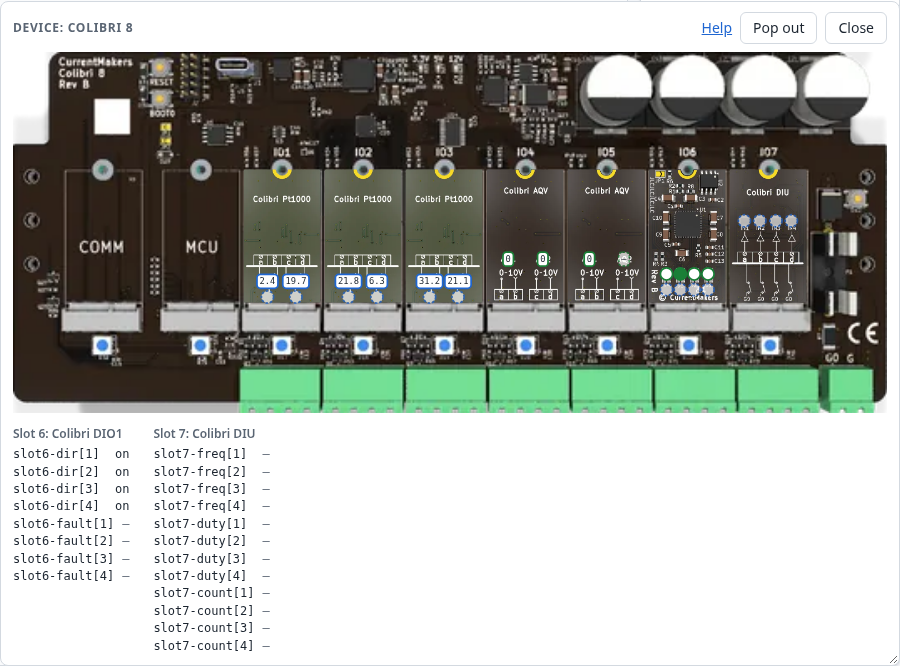
Hakkas knows the Colibri carrier and its I/O modules: Pt1000 sensors, analog outputs, relays, digital inputs. Every channel shows up by name, with its unit, ready to bind.
Develop at your desk, deploy to the plant
- •Build and test against the Colibri emulator, setting its sensors by hand and watching its outputs.
- •Download a process as one file, with its bindings and every composite block type it uses.
- •Upload it to the device. If its modules sit elsewhere, a mapping dialog asks where each port goes.
- •Uploaded processes arrive stopped. Nothing is driven before you say so.
- •Back up a whole controller to a file, and restore it on another.
Learn by building
The User's Manual is written for automation engineers. It skips the control theory you already know and is built around three examples that grow in size. All three run as they are against the Colibri emulator, so you can follow along without hardware.
A thermostat with a schedule
The first process you build: a room sensor, a hysteresis, a week schedule and a relay, step by step.
A heating circuit
An outdoor-compensated curve with night setback, a shunt valve PID made into a composite block type, summer stop and pump exercise.
An air handling unit
A complete unit: seasons, a room-compensated supply air setpoint, one regulator per season, and frost protection.
Automating a building?
Tell us about your installation. We can help you choose Colibri modules, get Hakkas running on them, and build the first processes with you.