
7. Composite block types
A composite block type is a block type of your own, made of other blocks (Section 2.6). Once made, it is in the palette like any built-in type. Each block of it runs its own copy of the blocks inside, at the same speed as if they were placed in the process directly.
Use one when a group of blocks does one recognizable job that you need more than once, or that makes a large process easier to read: an office-hours clock, a pump with its weekly exercise, frost protection. Chapter 13 makes some out of the air handling unit.
7.1 Creating one from a selection
Select the blocks (Section 5.2), right-click one of them or the canvas, and choose Create composite type…. The example below makes the thermostat's office-hours clock, three blocks, into a type.
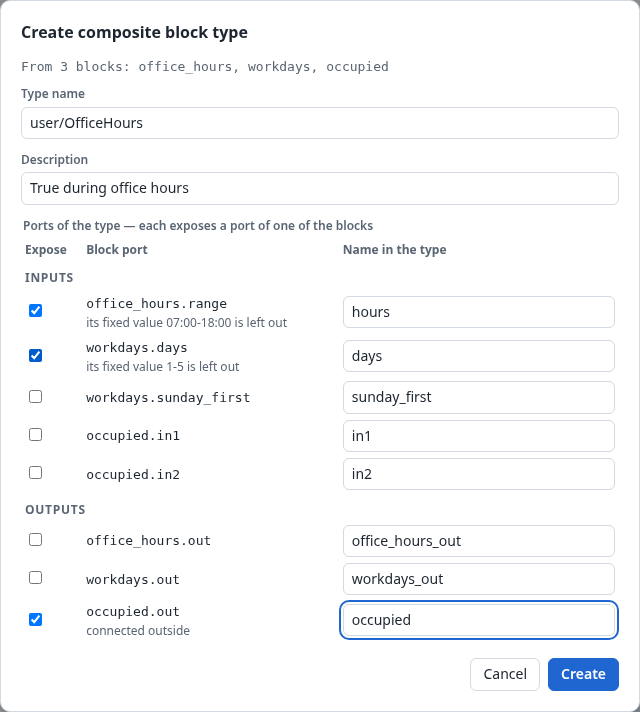
The dialog asks for:
A type name,
family/Name, such asuser/OfficeHoursorahu/FrostProtection:- Both parts may have letters, digits,
-and_, at most 64 characters in all. - The family becomes the type's group in the palette.
- The name must not be taken, by a built-in type or another composite type.
- Both parts may have letters, digits,
A description, shown in the palette's tooltip and in the inspector.
The type's ports. Every input and output of the selected blocks is a row, which you tick to make it a port of the type, under the name in the right column. Hakkas ticks some to begin with:
- inputs fed by a connection from outside the selection;
- outputs with a connection to outside it (connected outside);
- block ports that are process ports.
Tick or untick any others, and rename them to what they mean to whoever uses the type. Here
office_hours.rangeandworkdays.daysare ticked and namedhoursanddays, so that each block of the type can have its own hours.
Fixed values. A fixed value inside the selection becomes part of the type, and is the same in every block of it. An input that becomes a port of the type is fed from outside instead, so its fixed value is left out, as the dialog says (its fixed value 07:00-18:00 is left out). Set it on each block of the new type.
Create registers the type and saves it on the controller. It appears in the palette under its family. The selected blocks stay as they were: replace them by a block of the new type yourself, if you want to.
7.2 Looking inside, and editing
A composite type's palette entry has an ↗ button that opens the type's inside in the editor, like a process. A banner names the type, and its ports are drawn as process port markers.
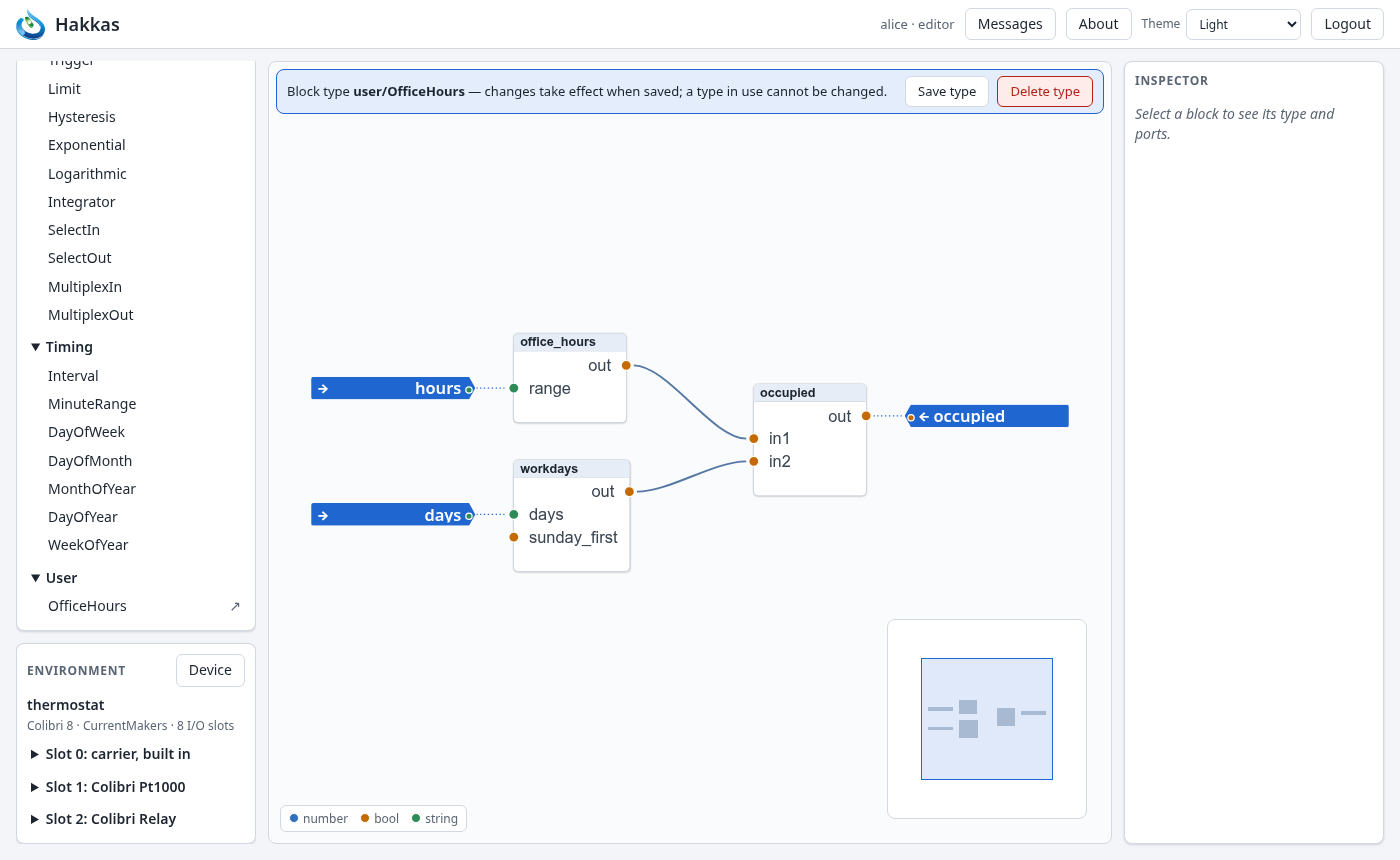
You can edit the inside like a process: add blocks, connect them, change values, add or remove ports. The changes take effect when you choose Save type, which replaces the type. Delete type removes it, after asking.
A type in use cannot be changed or deleted. A type is in use while any process has a block of it, or another composite type contains it. Save type and Delete type are then refused with Component in use. To change a type that is in use, there are two ways:
- Remove its blocks, save the type, and put them back.
- Make the changed version under a new name, for example
user/OfficeHours2, and replace the blocks one by one.
The second way lets the old blocks run until you replace them.
Renaming a type and changing its description from the editor are not possible yet.
7.3 Its ports
A composite type's ports behave exactly like a built-in type's:
- An input of the type is an input of a block inside. A connection to it, or a fixed value on it, feeds that inner input directly. An input fed by nothing rests at the inner input's resting value.
- An output of the type is an output of a block inside. It can be exposed under several names, but one inner input can be fed by only one type input.
- Types come from the inner ports: a port is a number, a bool or a text as the inner port is.
There is no extra step between the outside and the inside: a value reaches the inner block as quickly as if the blocks were in the process directly. Each block inside computes on change as always (Section 2.2).
7.4 Nesting, and the "in use" rules
A composite type may contain blocks of other composite types, to any depth. The palette shows a type only once it exists, so build from the inside out: first the small types, then the types that use them.
The rules:
- No recursion. A type cannot contain itself, directly or through another type.
- One source per input, inside as outside.
- In use means unchangeable. This protects running processes from a change under their feet: a type's blocks keep behaving as they did when they were placed.
The blocks inside a block of a composite type are not part of the process: they are not shown or selected in the process, and their names cannot clash with the process's own. To see their values, open the type (↗). Watching inside a running block is not possible yet.
7.5 Type libraries
Composite types are kept on the controller, one file per type, and are shared by all its processes. They travel:
- with a process: downloading a process includes every composite type it uses, and the types those use (Chapter 9);
- in a backup: every composite type on the controller;
- as type files: a library of ready-made types, such as the standard library
library/schedules/(schedule/DaySchedule,WeekSchedule,MonthSchedule,YearSchedule), can be uploaded with Upload… (Section 9.2) or installed by an administrator (Chapter 16).
When a type of the same name is already on the controller, an upload keeps the controller's version and says so. It never overwrites a type that a running process may use.